Free desktop app · v0.2.4

Find what's costing sales on your store.

DataCrunch Inspector crawls your Shopify, WooCommerce, or Magento store on Windows or Mac, scores storefront health from 0-100, and ranks broken product pages, crawl waste, and AI shopping blockers in a developer-ready fix list.

Free for 250 pages. No credit card. Download and scan in minutes.

Whole-site scans later if you need them. Pricing

Windows downloads may show an unidentified-publisher warning while we finish code signing. Click More infoRun anyway.

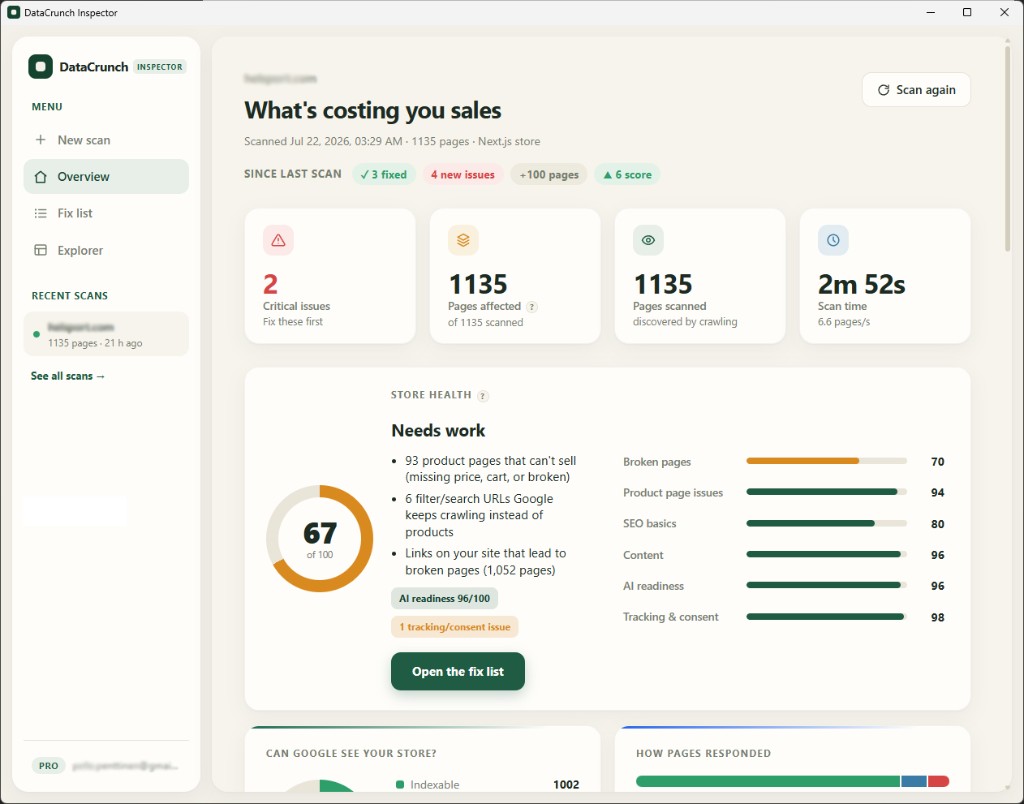
DataCrunch Inspector overview showing store health score and issues costing sales

Live scan · Next.js store · 1,135 pages in 2m 52s

What does a store health scan show?

One crawl returns a 0-100 store health score, critical issues first (product pages that cannot sell, crawl-budget waste, AI blockers), and a plain-English fix list your developer can act on, not a wall of cryptic crawl columns.

Inspector overview: score 67, critical issues, product pages that can't sell, and category breakdown

Free for 250 pages · No credit card

What you get

From vague worry to a ranked fix list.

Health score

Stop guessing what's wrong

A 0-100 store health score with product, SEO, content, and AI breakdowns. Not a wall of cryptic columns.

Verify loop

Fix it, then prove it

Recheck only the pages that were broken. Issues flip to Fixed or still affected without a full rescan.

AI readiness

Ready for AI shopping?

Check GPTBot, ClaudeBot, and PerplexityBot access. Catch product schema that only shows up after JavaScript runs.

How it works

How do you scan a store with Inspector?

Download the app, sign in with email (6-digit code, no license keys), paste your store URL, and get a score in about ten minutes. Pro unlocks on the same email when you subscribe.

  1. Download & install

    Windows or Mac installer with auto-updates. Free to download. No credit card.

  2. Sign in with email

    We send a 6-digit code to your inbox. Enter it in the app to unlock scanning.

  3. Scan your store

    Free covers 250 pages. Enough to spot the expensive problems.

  4. Upgrade when ready

    Need the whole catalog later? Subscribe with the same email. Pro unlocks in the app.

Why use a store-specific crawler?

Generic website crawlers miss ecommerce patterns. Inspector is built for product and category URLs, sold-out pages still indexed, missing price or add-to-cart, JS-only schema, and AI shopping readiness, so findings map to revenue, not just SEO hygiene.

Shopify-ready fix packs

Filter URL bloat, sold-out pages still indexed, missing ATC/price, schema that only loads in JS. Copy-paste Liquid where it helps.

Money-first overview

Broken product pages, crawl waste, AI blockers up top. Explorer stays for when you want the full table.

Scan compare

Pro: score trends and fixed vs new issues between scans.

Priority fix list

Plain-English issues with how to fix them. Recheck affected pages and see Fixed vs still present. CSV export is Pro.

Core Web Vitals

CrUX field data by page type: home, PLP, PDP.

Companion to DataCrunch Pro

Inspector finds storefront issues. Pro runs your ads and revenue ops daily. Use either or both.

Simple pricing

Start free for 250 pages. No credit card. Upgrade only when you need whole-site audits.

Free Pro
Pages per scan 250 Whole site (up to 100k)
Fix list + health score Full Full
Verify recheck 25 pages 500 pages
Scan history Last 5 Full
Scan compare No Yes
CSV export No Yes
Price $0, no card $19/mo or $149/yr

Most people start free

250 pages, full health score and fix list. No credit card.

Download free

When you need more

Audit your whole store, not just 250 pages

Full-site crawls, scan compare, CSV export, and the complete Explorer. Fix issues and prove progress to your team or clients.

  • Up to 100,000 pages per scan
  • Same email unlocks Pro in the Windows app
  • Cancel anytime from your billing portal

$12.42/mo

$149 billed annually · save $79/year vs monthly

Secure checkout via Stripe · Pro unlocks automatically when you sign in

Already subscribed? Manage your subscription

Frequently asked questions

Straight answers about what Inspector is, who it is for, pricing, and platforms.

What is DataCrunch Inspector?

DataCrunch Inspector is a desktop app for Windows and Mac that crawls your online store and scores storefront health from 0 to 100. It ranks issues that cost sales (broken product pages, crawl-budget waste, thin content, and AI shopping blockers) in plain language your developer can use. Free covers 250 pages with no credit card; Pro unlocks whole-site scans.

Who is DataCrunch Inspector for?

It is built for ecommerce operators and agencies on Shopify, WooCommerce, or Magento who need a storefront technical and merchandising audit without a generic website crawler. You download the app, paste your store URL, and get a prioritized fix list in minutes.

Does DataCrunch Inspector work with Shopify, WooCommerce, and Magento?

Yes. Inspector is built for those storefronts: product and category URL patterns, sold-out pages still indexed, missing add-to-cart or price, JS-only product schema, and AI shopping readiness checks. Fix guidance includes Shopify Liquid examples where they help.

Is DataCrunch Inspector free?

Yes to start. The free tier scans up to 250 pages with no credit card. Pro unlocks whole-site crawls (up to 100k pages), scan compare, and CSV export at $19 per month or $149 per year USD via Stripe.

How is Inspector different from DataCrunch Pro?

Inspector is a local desktop crawler for storefront issues that cost sales. DataCrunch Pro is a separate cloud SaaS that runs Google Ads and ecommerce operations day to day. Same brand family (F4 Labs); different products. You can use either or both.

How do I unlock Pro?

Subscribe on this page with your work email, then sign in to the desktop app with that same address. You receive a 6-digit email code, not a license key. Pro unlocks automatically; restart the app if it does not appear within a few minutes.

Does it run on Windows and Mac?

Yes. Windows (x64) and Mac are supported. Mac downloads are labeled by chip: Apple silicon (most Macs since late 2020) and Intel chip for older hardware. Mac is still an early build; email hello@f4.no if something breaks. On Windows, if the OS warns about an unidentified publisher while we finish code signing, use More info → Run anyway.

How many computers can I use?

Up to three devices per account. Signing in on a fourth signs out the oldest device. Your scans stay on each computer; the license follows your email.

What happens if I cancel Pro?

You keep the free tier (250 pages per scan). Scan history remains on your computer. Pro-only features such as whole-site scans, compare, and CSV export lock again until you resubscribe.

See your store health score in 10 minutes

Download free, scan 250 pages, no credit card. Know what to fix first.

Free · No credit card

Need the whole catalog later? Pro pricing